Ive been using Rewind for 4+ months, and its been long updated to the point where you no longer have to enable/disable “stretch on import” to get proper exported loops. I personally worked with the dev to beta test a couple patches on this exact subject, and it was fixed months ago. Smart drag/force to loop solves those issues.
The lack of native retrospective in Bitwig caused me to look around for a 3rd party solution, and imo Rewind is the best out there. 90 minute rolling buffer, auto restart/autostart, gated recording from 1 second, record all audio and midi at the same time, etc. If the Bitwig dev does eventually make a native solution, it has stiff competition lol.
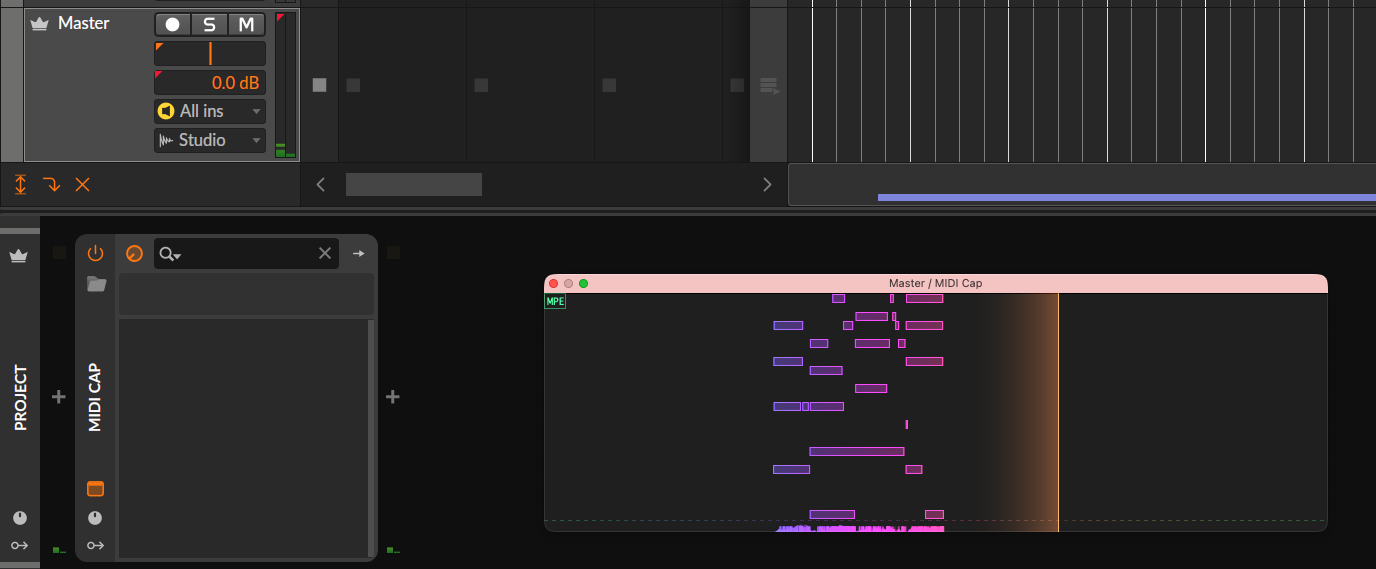
Has anyone tried Midi Cap? It seems to cover this wish… The free version records the last 60 seconds and the paid one costs only $14 USD. Moss featured it yesterday in an uodate about CLAP plugins.
I’ve find myself open Cubase again just to write chords and melodies and never lose anything i randomly play. No idea why they haven’t added this, it’s been a top request for many many years now. I can’t see myself renewing unless they add midi capture or scale lock in the piano roll, hopefully they add both at the same time before 2025
I find it perplexing that with this being the most popular feature request for Bitwig Studio that there is no mention or discussion of how to handle the Note FX when capturing.
I had to scroll way down to find any mention of it: Bounce Notes (this request needs WAY MORE LOVE)
Note FX are one of the most powerful yet often overlooked features of this DAW; it’s simply not possible to accomplish many of what Note FX can do elsewhere.
So, with the proposed implementation of MIDI capture, are we looking to only get an identical implementation to what Ableton has? It’s not without its problems when it comes to multiple tracks with multiple different respective inputs: Multi Track Midi Capture - Not Working? - Ableton Forum
There must be a better way to implement this desired behavior in Bitwig. Ideally one that includes the optional ability to bake in Note FX. MIDI capture implementation via continual background recording would be fine, but I believe there is more than meets the eye to consider here.
For the most part it does cover this request. But people seem to really want a native solution, that as proposed however is likely to come with the extra added step of having to arm the tracks you want to capture like in Ableton. This would mean that MIDI capture would not be functional for recording playing MIDI clips and would entirely disregard Note FX.
Given the proposed implementation, this would leave many people still needing to use MIDI Cap in conjunction with the proposed MIDI capture implementation. We’d also need: Bounce Notes
As an aside, MIDI Cap can work faster for already recorded MIDI (to bake in Note FX) if you playback at the max bpm of 666, take the recorded MIDI into the DAW, then go back to your original bpm setting
This really is the best approach. I’m doubtful that an official implementation would functionally be any better than this. It can even capture Note FX this way!
yes it’s possible with few plugins, the dedicated one is midicap, you can place it on dedeicated track with monitoring always on and inputs set to All ins (as well as setting all channels - Same, instead of 1), therefore it would always capture input from all midi ports, but it won’t capture output from tracks, if there are any generators or notefx that needs to be captured. Ableton Live doesn’t do that either. you could though make another track that would have bunch of note receivers that route midi from all necessary tracks and then put midicap at the end of chain. you could also place thouse note receivers in layers and then make a channel mappers in each so they all end up in different channels, even if they were all on channel 1 originally. this would make it easier to sort through captures of different tracks.
It’s not a feature I thought would be too important, until well… I used it!
It stops me recording so many junk takes (and then needing to comb through it for good bits later) when I’m improvising… leading to a tidier session!
Meanwhile I tried Midi Cap. Unfortunetly the method discribed by pike here is not working with Bitwig 6
Add MIDI cap as the first device on Master (doesn’t have to be Master, could be any track if you wanted to have a dedicated track for midi capture)
2a. (Optionally) In the MIDI cap post-fx chain add a channel filter with all channels disabled to prevent midi notes from reaching other plugins on master.
2b. (Optionally) In the mappings panel map a keyboard shortcut to open the MIDI cap window
Change the track input to Note Inputs > All Ins
Set the monitor mode to ‘On’
Save this setup as your default new track template
In the master track Midi Cap is not receiving notes. I thought I could use the Note Receiver to solve that but it needs tracks and can not use controllers as a source.
Midi Cap as single midi track → that one needs to have rec arm active. But I have and want to keep “auto-arm” settings enabled. Is there a solution to use midi cap silently in the backround without any addiotnal steps to take care of?
I tried out both Rewind and Midi Cap. Both work well but Midi Cap looks nicer and captures usable MPE, where Rewind struggles in that area for some reason. Also cheaper which is nice. Having everything in the master or other dedicated track works for my needs and I’m not sure a native solution could be better. Works fine in Bitwig 6 as well.